CheckBoxList 和 RadioButtonList這兩個清單控制項,在ASP.NET 4.0中的RepeatLayout屬性有做了延伸性的功能加強,在以往的ASP.NET 3.5版本中,RepeatLayout屬性只有兩個選擇可以設定,分別為:Table和Flow。
如果這個屬性設定為 RepeatLayout.Table,則清單中的項目會顯示在資料表,如果這個屬性設定為 RepeatLayout.Flow,則清單中的項目不顯示資料表結構。
例如假設我們把控制項設定為以下設定:
<asp:CheckBoxList ID="CheckBoxList1" runat="server" RepeatLayout="Flow">
<asp:ListItem Text="CheckBoxList" Value="cbl" />
</asp:CheckBoxList>
<asp:RadioButtonList runat="server" RepeatLayout="Table">
<asp:ListItem Text="RadioButtonList" Value="rbl" />
</asp:RadioButtonList>
那麼瀏覽網頁後所得到的HTML將分別轉譯為sapn和table為:
<span id="CheckBoxList1"><input id="CheckBoxList1_0" type="checkbox" name="CheckBoxList1$0" />
<label for="CheckBoxList1_0">CheckBoxList</label>
</span>
<table id="RadioButtonList1" border="0">
<tr>
<td><input id="RadioButtonList1_0" type="radio" name="RadioButtonList1"
value="rbl" />
<label for="RadioButtonList1_0">RadioButtonList</label></td>
</tr>
</table>
那麼ASP.NET 4.0又多了另外兩個選擇設定,分別為:OrderedList 和 UnorderedList,如果這個屬性設定為 RepeatLayout. OrderedList,則清單中的項目會顯示使用ol搭配li設定顯示,如果這個屬性設定為 RepeatLayout. UnorderedList,則清單中的項目會顯示使用ul搭配li設定顯示。
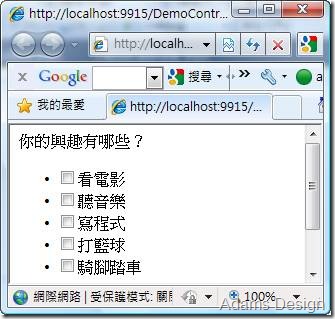
以下假設針對CheckBoxList分別設定RepeatLayout. OrderedList和RepeatLayout. UnorderedList,我們來看看所呈現不同的結果,首先當設定為OrderedList,則如下圖所示,會有順序性的排序編號資料:

如果是設定為UnorderedList,則會呈下如下圖所示,並不會有順序編號,但是會用條列重點方式:
這裡要特別注意一點,假設你設定RepeatLayout為OrderedList 或是 UnorderedList,那麼另一個屬性RepeatDirection就不能設定修改為Horizontal,否則將會出現設計上的錯誤,預設只能搭配Vertical。




 發表文章
發表文章


