2011年7月17日 星期日

How to using Dynamic Data in GridView-2(如何在GridView上套用DynamicData動態資料機制)

在亞當斯的前一篇文章中:How to using Dynamic Data in GridView-1(如何在GridView上套用DynamicData動態資料機制)有寫到可以使用Dynamic Data 機制來快速呈現資料庫的資料,但是上述連結的那篇文章是用ASP.NET Dynamic Data Linq to WebSite專案來設計,所以預設不用特殊的設定就可以達到符合的功能,然後若是修改使用ASP.NET Dynamic Data Entities WebSite專案,又是如何?

1.建立一個ASP.NET Dynamic Data Entities WebSite專案:

clip_image002

2. 同之前的步驟,新增一個ADO.NET Entity Data Model,然後設定Pubs資料庫為資料來源,並修改Global.asax,這邊值得一提的是因為EDM的模式所產生的DataContext類別會加上命名空間,所以在設定骨幹網站的時候要給完整名稱,如:pubsModel.pubsEntities

DefaultModel.RegisterContext(typeof(pubsModel.pubsEntities), new ContextConfiguration() { ScaffoldAllTables = true });

routes.Add(new DynamicDataRoute("{table}/{action}.aspx"){
Constraints = new RouteValueDictionary(new { action = "List|Details|Edit|Insert" }),Model = DefaultModel});

3. 新增一個網頁應用程式,加入GridView並設定資料來源為EntityDataSource,這邊我們挑選employee物件當作資料呈現來源

clip_image003

4. GridView控制項進入編輯欄位視窗,先找到動態欄位

clip_image004

5. 把動態欄位中的關聯欄位Jobs和Publishers加入GridView中

clip_image005

6. 瀏覽網頁,此時會出現錯誤訊息,如下圖所示:

clip_image006

主要是因為使用EntityDataSource設定資料來源的時候,它的一個很重要的屬性: ContextTypeName並不會自動給值,必須由開發者手動設定值。

7. 因此切換到EntityDataSource的屬性視窗,設定ContextTypeName為:pubsModel.pubsEntities

clip_image007

8. 以下是設定完成的EntityDataSource屬性資料

clip_image008

9. 最後重新瀏覽網頁,可以看到動態欄位Jobs和Publishers可以正確地顯示在GridView控制項上,並且擁有關聯網頁可以檢視。

clip_image009

How to using Dynamic Data in GridView-1(如何在GridView上套用DynamicData動態資料機制)

ASP.NET 4 有提供一個開發架構:ASP.NET Dynamic Data,可以快速地根據資料元件動態產生對應的網頁,但是如果想要將ASP.NET Dynamic Data套用到既有自行設計的GridView控制項的話來呈現資料的話,那麼就可以加入動態欄位來呈現。

以下就來示範如何在GridView控制項上套用DynamicData動態資料機制,以產生關聯資料列表:

1. 新增一個ASP.NET Dynamic Data Linq to WebSite專案

clip_image001

2. 加入一個LINQ To SQL Classes,並設定資料來源為Northwind.dbml,挑選幾個要測設的資料表,如:Product…等等,如下圖所示:

clip_image003

3. 修改Global.asax先啟用Dynamic Data骨幹網站,讓此網站可以快速動態產生資料網頁:

DefaultModel.RegisterContext(typeof(NorthwindDataContext),

new ContextConfiguration() { ScaffoldAllTables = true });

routes.Add(new DynamicDataRoute("{table}/{action}.aspx")

{

Constraints =

new RouteValueDictionary(new { action = "List|Details|Edit|Insert" }),

Model = DefaultModel

});

4. 瀏覽Default.aspx測試檢視是否可以成功啟用動態網頁

clip_image004

5. 接著要把動態網頁規則套用至自己設計的網頁中,先增一個DynamicGridView.aspx,加入一個GridView控制項,並設定Data Source為LINQ

clip_image005

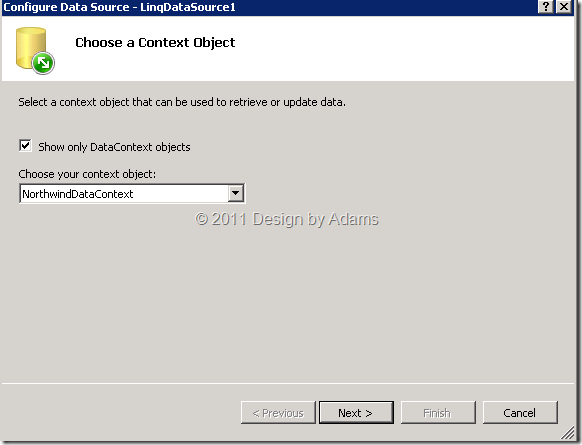
按下OK,挑選Context Object為:NorthwindDataContext。

clip_image006

6. Table挑選Product(Table<Product>)為主要呈現的資料內容,欄位可以任意選,但是盡量挑選有參考其他資料表欄位關聯性質的,例如:Category…等等,這是為了凸顯動態資料的彈性。

clip_image007

7. 先瀏覽DynamicGridView.aspx,目前跟一般GridView設計時沒什麼兩樣,注意一下SupplierID 和 CategoryID兩個欄位,只有秀ID值。

clip_image008

8. 但是通常使用者想要看的資料並不會是ID值,而是希望看到名稱,甚至更聰明一點希望可以將關聯建立起來,可以直接檢視明細資料。

9. 刪除GridView的SupplierID 和 CategoryID欄位,並加入動態欄位下的Category和Supplier。

clip_image009

10. 再次瀏覽DynamicGridView.aspx就會發現新增的兩個欄位Category 和 Supplier資料都動態產生,甚至有聯結的欄位也自動將關聯加上。

clip_image011

11. 點選Category就可以檢視Categories/ListDetails.aspx的列表資訊。

clip_image012

2011年6月30日 星期四

Google Swiffy Lab Converts Flash SWF files to HTML5

Swiffy converts Flash SWF files to HTML5, allowing you to reuse Flash content on devices without a Flash player (such as iPhones and iPads).

Swiffy currently supports a subset of SWF 8 and ActionScript 2.0, and the output works in all Webkit browsers such as Chrome and Mobile Safari. If possible, exporting your Flash animation as a SWF 5 file might give better results. (這邊只有寫到支援ActionScript 2.0,其實這對後來設計的Flash是會有問題的)

如果是使用IE9去瀏覽:http://swiffy.googlelabs.com/ 就會看到以下的警示訊息

Your browser may not display Swiffy's output correctly. You need a Webkit browser such as Chrome or Safari for the gallery and previews to be displayed correctly.

所以亞當斯就使用Safari來測試,這樣就可以知道在iPhone和iPad上的呈現模式為何,上傳一個用Flash設計的Banner,結果如下:

Swiffy

發現還是會有一些小問題,例如以上所列的四點:

  • Blend modes are not supported. (1 occurrences)
  • Scenes are not supported. (1 occurrences)
  • ActionScript 3.0 is not supported. (2 occurrences)
  • Advanced text rendering using continuous stroke modulation is not supported. (4 occurrences)

如果要把轉換的結果存下來,網頁上也說明:
You can download or preview the Swiffy conversion at the following URL. Just right click and "Save link as..." to download. The URL will expire after 15 minutes.

總之,Swiffy 相信還有改進的空間,不過對於只搭配ActionScript 2.0地來說應該是沒問題的,也還蠻方便的小工具,所以亞當斯在這邊也小小的推一下囉!

2011年6月23日 星期四

List Template ID in SharePoint 2010

亞當斯之前開發SharePoint 2007時,有用到SharePoint清單對應的ID,在以下網址曾經整理一個列表參考:List Template Id In Moss 2007,如今SharePoint 2010多了更多新的清單,因此 ListTemplate ID 也就更豐富了,以下是SharePoint 2010 ListTemplate ID對應表。

例如:常用的文件庫就是101、Task是107…等等

ListTemplateType Value

Description and ID

InvalidType

Not used. Value = -1.

NoListTemplate

unspecified list type. Value = 0

GenericList

Custom list. Value = 100.

DocumentLibrary

Document library. Value = 101.

Survey

Survey. Value = 102.

Links

Links. Value = 103.

Announcements

Announcements. Value = 104.

Contacts

Contacts. Value = 105.

Events

Calendar. Value = 106.

Tasks

Tasks. Value = 107.

DiscussionBoard

Discussion board. Value = 108.

PictureLibrary

Picture library. Value = 109.

DataSources

Data sources for a site. Value = 110.

WebTemplateCatalog

Site template gallery. Value = 111.

UserInformation

User Information. Value = 112.

WebPartCatalog

Web Part gallery. Value = 113.

ListTemplateCatalog

List Template gallery. Value = 114.

XMLForm

XML Form library. Value = 115.

MasterPageCatalog

Master Page gallery. Value = 116.

NoCodeWorkflows

No Code Workflows. Value = 117.

WorkflowProcess

Custom Workflow Process. Value = 118.

WebPageLibrary

Wiki Page Library. Value = 119.

CustomGrid

Custom grid for a list. Value = 120.

SolutionCatalog

Solutions. Value = 121

NoCodePublic

No Code Public Workflow. Value = 122

ThemeCatalog

Themes. Value = 123

DataConnectionLibrary

Data connection library for sharing information about external data connections. Value = 130.

WorkflowHistory

Workflow History. Value = 140.

GanttTasks

Project Tasks. Value = 150.

Meetings

Meeting Series (Meeting). Value = 200.

Agenda

Agenda (Meeting). Value = 201.

MeetingUser

Attendees (Meeting). Value = 202.

Decision

Decisions (Meeting). Value = 204.

MeetingObjective

Objectives (Meeting). Value = 207.

TextBox

Text Box (Meeting). Value = 210.

ThingsToBring

Things To Bring (Meeting). Value = 211.

HomePageLibrary

Workspace Pages (Meeting). Value = 212.

Posts

Posts (Blog). Value = 301.

Comments

Comments (Blog). Value = 302.

Categories

Categories (Blog). Value = 303.

Facility

Facility. Value = 402

Whereabouts

Whereabouts. Value = 403

CallTrack

Call Track. Value = 404

Circulation

Circulation. Value = 405

Timecard

Timecard. Value = 420

Holidays

Holidays. Value = 421

IMEDic

IME (Input Method Editor) Dictionary. Value = 499

ExternalList

External. Value = 600

IssueTracking

Issue tracking. Value = 1100.

AdminTasks

Administrator Tasks. Value = 1200.

HealthRules

Health Rules. Value = 1220

HealthReports

Health Reports. Value = 1221

如果各位要查詢MSDN的話,可以使用"SPListTemplateType"關鍵字查詢。

2011年6月22日 星期三

[Resource] Web Standards Update for Microsoft Visual Studio 2010 SP1

以下是Web Standards Update for Microsoft Visual Studio 2010 SP1在官網相關的敘述,有興趣的朋友可以先參考:Web Standards Update provides the much wanted HTML5 & CSS3 support to Visual Studio 2010 SP1. It brings VS 2010 intellisense & validation as close to W3C specification as we could get via means of an extension. The most notable supported features by this extension are:

image_axdHTML5 – Video, Audio, Input Type, Drag & Drop, WAI-ARIA, Microdata, Schema.org

  • Browser API – GeoLocation & Local Storage
  • CSS3 – 2D Transforms, 3D Transforms, Animations, Background & Borders, Basic Box Model, Basic UI, Behavior, Color, Flexible Box Layout, Fonts, Paged Media, Hyperlink Presentation, Line, Lists, Marquee, Media Queries, Multi Column, Namespaces, Presentation Levels, Ruby, Selectors, Speech, Syntax, Template Layout, Text & Transitions. It also supports vendor specific prefixes like –ms, -webkit & -moz.

download

其他更詳細的一些說明,也可以參考保哥Will整理的資訊和內容:介紹好用 Visual Studio 2010 擴充套件:Web Standards Update for Microsoft Visual Studio 2010 SP1